WhatsApp Auto Reply: A Singapore SME Guide
 Darrel Liew · CEO and co-founder, Cortex Lab AI
WhatsApp auto reply, in the free WhatsApp Business app, means away messages and greeting messages, which send one fixed text to anyone who messages you. This guide shows how to set them up, the limits in WhatsApp's own help pages, and what to write so the reply does more than say you're closed. It also covers when a reply that answers the customer's question is worth paying for, and what that costs.
Take an example: a tuition centre in Tampines run by three teachers. Parents message in the evening, once the children are asleep, and most ask two things: the monthly fee for P5 Maths, and whether the Saturday class has space. The centre's away message says it's closed and a teacher will reply tomorrow. A parent who wants an answer tonight messages two other centres, and books a trial with whichever one answers first. An auto reply that gives the fee and the Saturday timetable at 10pm, and passes the parents ready to book to a teacher, keeps that parent talking to this centre.
Cortex Lab AI builds WhatsApp chatbots for Singapore startups and SMEs, including Kai Dojo, our WhatsApp assistant. The last section says where it fits.
How do you set up a WhatsApp Business auto reply?
Open the WhatsApp Business app, go to Tools, tap Away message and turn on Send away message. Then write the text, choose a schedule and choose who receives it. The steps below follow WhatsApp's Help Center for iPhone. Android is the same, except you tap OK after editing the message and Save at the end.
- Open the Tools tab and tap Away message.
- Turn on Send away message.
- Tap the message to edit it, then save.
- Tap Schedule and choose Always send, Custom schedule or Outside of business hours. The last option appears only after you've set business hours in your business profile.
- Tap Recipients and choose Everyone, Everyone not in address book, Everyone except… or Only send to….
Greeting messages sit in the same Tools tab. WhatsApp sends one to customers "when they first message you", and again when they message "after 14 days of inactivity in their chat with you". A customer who wrote to you last week gets no greeting.
Quick replies are not automatic. WhatsApp describes them as "shortcuts for the messages you frequently send to your customers". You type "/" in a chat, pick one, edit it if needed and send it yourself. The app stores up to 50.
All three are WhatsApp Business app features. If your business runs on a personal WhatsApp account, you'd move the number to the Business app first. WhatsApp says "You can't use the same phone number with each app simultaneously, but it is possible to move between them."
What can a WhatsApp auto reply answer, and what can't it?
An away or greeting message sends the same text whatever the customer asked. It answers a question only when one fixed answer works for everyone, such as your hours, your address or a link to your fee list. It can't say whether this Saturday's class has space, or quote for a job it hasn't seen.
| Feature | Answers the question? | Sent by |
|---|---|---|
| Away message | If in the text | The app |
| Greeting message | If in the text | The app |
| Quick replies | Yes | A person |
| AI assistant | Yes, if it knows | Software |
For the tuition centre, a parent asks at 10pm: "How much is P5 Maths, and is Saturday full?" The away message replies in seconds with "We're closed." The parent still has no fee and no slot, so the question goes to the next centre.
The cheapest fix is to write your most-asked answers into the away message itself. Fees and timetables that rarely change belong there:
Hi, thanks for messaging [Centre]. We're closed now, and a teacher will reply by 10am. Fees for every level are here: [link]. Saturday classes run from 9am to 1pm, and the teacher will confirm which ones have space.
That answers the fee tonight. Availability still waits until morning, because a fixed text can't check a class list.
Meta is also adding its own AI to the app. Its page says "Meta Business Agent sends personalized responses to customers 24/7 to gather information and drive sales", learning from your Facebook Page, past chats and website. It is "Available to eligible businesses in select markets, with additional markets launching soon", and the page names no countries. Check your Tools tab to see whether you have it.
Why do leads keep messaging other businesses after an auto reply?
An acknowledgement doesn't answer what they asked, and a customer comparing options keeps asking until someone does.
The Lead Response Management Study, run by InsideSales.com with James Oldroyd of MIT's Sloan School of Management and presented in October 2007, examined three years of data from six companies, more than 15,000 web leads and over 100,000 call attempts. It found that "The odds of qualifying a lead if called in 5 minutes versus 30 minutes drop 21 times."
An away message is fast and qualifies nobody. In our reading of the study, the clock that matters starts when the customer asks and stops at the first useful answer. For the tuition centre, that's the fee, the class times and an offer of a trial. Our WhatsApp speed-to-lead system does this: it replies to each new enquiry within a minute, asks your qualifying questions and offers a slot from your calendar.
Can an AI auto reply use your existing WhatsApp number?
Yes, if your provider supports Meta's coexistence option. Meta's developer guide lets businesses "onboard using their existing WhatsApp Business app account and phone number", so software can answer through the WhatsApp Business Platform (often called the WhatsApp Business API) while you keep the app on your phone. Meta says "WhatsApp keeps messaging history between both apps in sync", and messages you send from the app "will continue to be free".
Some app features stop working on a shared number. Meta's guide says broadcast lists are disabled, view-once messages are disabled in one-to-one chats and disappearing messages are turned off in one-to-one chats. Group chats carry on in the app but are not synchronised, so the software never sees them. Ask the provider whether it supports coexistence before you sign.
How much does an auto reply that answers cost?
You pay for three things: the tool or service, any setup fee, and Meta's fee per message on the Business Platform. For a small business, the Meta part can be zero.
Free-form replies sent within 24 hours of a customer's message are service messages. Meta's pricing page says "Each business phone number has one free tier of 1,000 delivered service messages per month". Past that, Meta's Singapore-dollar rate card charges S$0.0205 per service message to a Singapore number.
For the tuition centre, say 100 new enquiries a month with five automatic replies each. That's 500 replies, inside the free 1,000, so Meta charges nothing. At 400 enquiries a month, 2,000 replies would mean 1,000 charged, or S$20.50. Our WhatsApp Business API pricing guide covers every message type and rate.
| Option | Answers written by | Per month |
|---|---|---|
| App away message | You, one text | Free |
| Subscription tool | You | S$30 to S$640 |
| Kai Dojo | Our team | S$149 |
The subscription range is from our AI chatbot cost guide, which lists ready-made tools at about S$30 to S$640 a month. Meta's message fees come on top of both paid options.
A subscription tool answers only as well as the answers you write, and keeping them current is ongoing work. Kai Dojo, our WhatsApp assistant, costs S$149 a month, all in, on a 12-month package, within the price range of a tool you set up yourself. Our team sets it up and tunes it on your real conversations, weekly in the first month, so it keeps improving without taking your time.
If the reply also needs to book a slot in your calendar, that's a connected system. Our WhatsApp AI chatbot answers from your price list and timetable and saves bookings to Google Calendar, and the WhatsApp speed-to-lead system qualifies new enquiries and books them. Setup for each starts from S$3,499, with a monthly fee set by your volume.
What happens when a WhatsApp auto reply can't answer?
Plan for these before you switch anything on:
- Your phone is off or offline. The app sends away messages from your device, and WhatsApp's Help Center says it "must have an active internet connection" to do so. A phone left off over the weekend sends nothing.
- The customer wrote recently. A greeting goes out again only after 14 days of inactivity, so a parent who messaged last week and returns tonight gets no greeting.
- Meta Business Agent is switched on. WhatsApp says "Greeting messages are automatically disabled when Meta Business Agent is connected."
- The question isn't in the answers. An AI assistant should say a person will reply and when, then pass the chat on with the question attached. Meta's WhatsApp Business Messaging Policy says a business using automation "must also have available prompt, clear, and direct escalation paths".
- The customer sends a voice note or a photo. Decide in advance who handles these. Sending them to a person is the safe default.
- You reply more than 24 hours later. Meta's templates overview says "Template messages are the only type of message that can be sent to WhatsApp users outside of a customer service window", so a late follow-up needs a pre-approved template, which Meta usually charges for.
- The assistant gets an answer wrong. Read the conversations each week, and fix the source, such as an old fee list, so the mistake doesn't repeat.
Questions to ask before you pay for an AI auto reply
- Does it answer from our own fees, timetable and policies, and can we read every answer it gave?
- What does it do with a question it has no answer for, and who on our team gets the handover?
- Can we keep our current number through coexistence, and which app features will we lose?
- Who updates the answers when our prices or timetable change, and is that in the monthly fee?
- Are Meta's message fees passed through at cost, and does the dashboard show how much of the free 1,000 we've used?
- Can it offer a slot from our calendar, or does a person confirm every booking?
- Where are conversations stored, and are they used to train any AI model? Our PDPA checklist for AI chatbots covers what to ask.
- If we leave, do we keep the phone number and the conversation history?
Which WhatsApp auto reply fits your business?
Below about ten enquiries a day, with one or two people answering, start with the free app. Put your fee list and fixed answers in the away message, turn on a greeting, and save quick replies for the rest.
An assistant that answers makes sense once enquiries arrive after hours with questions a fixed text can't cover, replies fall behind during the day, or several staff answer from one number. If customers also need a slot from your calendar in the same chat, look at a connected system such as speed-to-lead.
- Under about 10 enquiries a day, and one fixed text answers most of them?Yes Start with the app's away and greeting messages, with your answers in the text.
- Do customers need a slot from your calendar in the same chat?Yes Look at a reply system connected to your calendar.
- Look at an AI assistant that answers from your fees and policies
- It answers the common questions and hands the rest to your staff
For more on what an assistant should answer and what it should hand over, see our WhatsApp chatbot guide.
Where Kai Dojo fits
Kai Dojo is our done-for-you WhatsApp assistant for Singapore startups and SMEs, from gyms and salons to clinics and tuition centres. It costs S$149 a month, all in, on a 12-month package, about what a chatbot tool you set up yourself costs. We set it up from your real conversations and tune it weekly in the first month. It answers your customers' common questions, such as fees, hours and timetables, at any hour, and hands bookings and harder questions to your staff. Meta's per-message fees are the only extra.
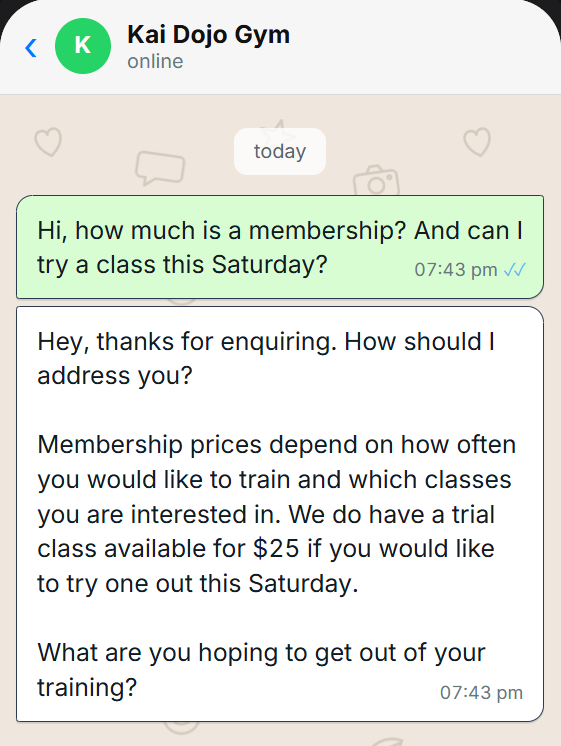
In our demo for a gym, one message asks the membership price and for a class on Saturday. The assistant answers both from the gym's own information and asks a question back, where an away message would only say the gym will reply later.
Bring last month's enquiries to a free 30-minute consultation and we'll show you how Kai Dojo would handle them.
Frequently asked questions
Can you set an auto reply on personal WhatsApp?
WhatsApp's Help Center describes away and greeting messages for the WhatsApp Business app. One number can't run both apps at the same time, but WhatsApp says you can move a number between them.
Why isn't my WhatsApp away message sending?
Check that your phone is on and connected, since the app sends away messages from your device. Then check the schedule (the business-hours option needs business hours set in your profile) and the recipient list.
How often does a WhatsApp greeting message send?
On a customer's first message, and again when they message after 14 days of inactivity in that chat. It is disabled while Meta Business Agent is connected.
Is WhatsApp auto reply free?
In the WhatsApp Business app, yes. On the WhatsApp Business Platform, Meta gives each number 1,000 free service messages a month, then charges S$0.0205 per reply to a Singapore number, and your provider charges for its service.
Can a WhatsApp auto reply use AI?
Yes. Meta is rolling out Meta Business Agent in the app to eligible businesses in select markets. Otherwise, an AI assistant connects through the WhatsApp Business Platform, and with coexistence you can keep your current number.
How many quick replies can you save?
Up to 50 in the WhatsApp Business app. You send each one yourself by typing "/" in a chat.
Sources checked 26 October 2026: WhatsApp Help Center, how to use away messages, how to use greeting messages, how to use quick replies and moving between WhatsApp Messenger and WhatsApp Business; WhatsApp Business, Meta Business Agent and Business Messaging Policy (updated 23 September 2026); Meta for Developers, pricing and its SGD rate card effective 1 October 2026, onboarding WhatsApp Business app users (coexistence) and message templates overview; InsideSales.com and James Oldroyd, Lead Response Management Study (October 2007, copy of the study's own web page hosted by Mortech; vendor study).